--[[ Please wait 15-30 seconds for the UI to load ]]
--[[ Please make sure you've read the instructions on how to paste an image URL before using it.

1. Android
Google Chrome: Find image → Click the image you want to draw → Hold the image → Open image in new tab → Copy the image URL from the search bar
Kiwi & Brave: Find image → Click the image you want to draw → Hold the image → Copy image link

2. iOS
Make sure you are NOT using SAFARI. Please use Google Chrome → Find image → Click the image you want to draw → Hold the image → Click Share → Click Copy

3. PC
Any browser you want → Find image → Click the image you want to draw → Right mouse click → Click Copy image address

If it ends with .html or anything else, then it is NOT an image. ]]
loadstring(game:HttpGet("https://raw.githubusercontent.com/LunarielLovely/Scripts/refs/heads/main/StarvingArtist2"))()1. Android
Google Chrome: Find image → Click the image you want to draw → Hold the image → Open image in new tab → Copy the image URL from the search bar
Kiwi & Brave: Find image → Click the image you want to draw → Hold the image → Copy image link
2. iOS
Make sure you are NOT using SAFARI. Please use Google Chrome → Find image → Click the image you want to draw → Hold the image → Click Share → Click Copy
3. PC
Any browser you want → Find image → Click the image you want to draw → Right mouse click → Click Copy image address
If it ends with .html or anything else, then it is NOT an image. And Some Image Will Not Supported
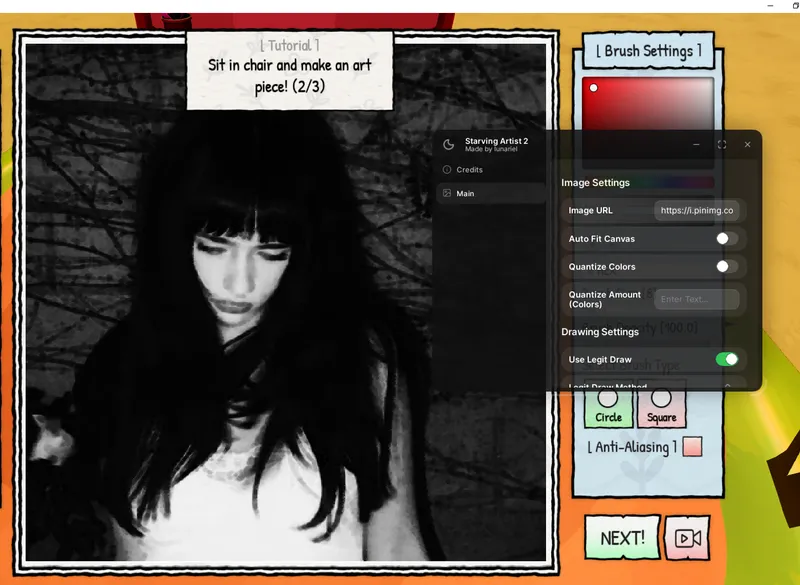
[[ Main Tab ]]
[+] Input Image URL
[+] Toggle Auto Fit Canva
[+] Toggle Quantizion & Custom Amount Colours
[+] Toggle Legit Draw (DFS - Pixel by pixel)-
[+] Customize Draw Speed
1--[[ Please wait 15-30 seconds for the UI to load ]]
2--[[ Please make sure you've read the instructions on how to paste an image URL before using it.
3
41. Android
5Google Chrome: Find image → Click the image you want to draw → Hold the image → Open image in new tab → Copy the image URL from the search bar
6Kiwi & Brave: Find image → Click the image you want to draw → Hold the image → Copy image link
7
82. iOS
9Make sure you are NOT using SAFARI. Please use Google Chrome → Find image → Click the image you want to draw → Hold the image → Click Share → Click Copy
10
113. PC
12Any browser you want → Find image → Click the image you want to draw → Right mouse click → Click Copy image address
13
14If it ends with .html or anything else, then it is NOT an image. ]]
15loadstring(game:HttpGet("https://raw.githubusercontent.com/LunarielLovely/Scripts/refs/heads/main/StarvingArtist2"))()No comments yet. Be the first to comment!